GPS LEADERS
Starter interrupt Install guide · October 2026

Install guide · starter interrupt · keep at the bench

Starter Interrupt Install Guide

Check before you cut.

Starter interrupt adds a relay to a hardwired tracker so the vehicle can be stopped from starting, remotely, from the platform. Install the tracker first (Hardwired Tracker Install Guide), then wire the relay below. Most callbacks come from the same few mistakes, all listed on page 2.
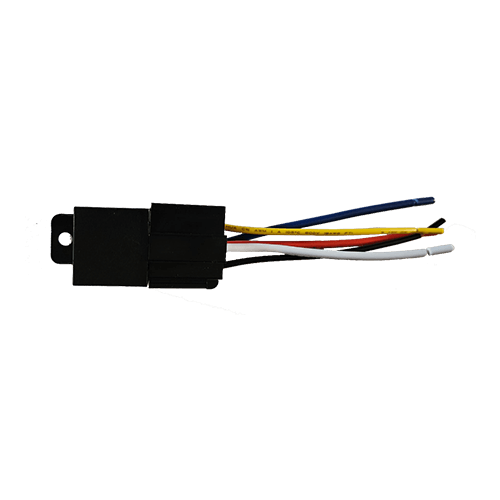
The GPS Leaders starter interrupt relay harness

Wiring at a glance

WireConnect toNote
Yellow (relay)Terminal 85Constant 12 V: battery, always hot
Brown (tracker)Terminal 86The tracker's output: it triggers the relay
Starter wire, key sideTerminal 30Cut the starter wire; this end runs to the ignition switch
Starter wire, starter sideTerminal 87aThe other cut end, running to the starter

The relay terminals

Starter wire IN from the key Starter wire OUT to the starter RELAY 30 87a 87 85 86 Yellow · constant 12 V Brown · tracker output
Coil off (default): 30 and 87a are connected, so the vehicle starts normally. Coil energized: the contact opens and the starter circuit is broken.

Vehicles with an engine computer

  1. Expect low voltageOn many newer vehicles the starter wire goes to the engine computer and carries a low signal voltage, not 12 V.
  2. Use a voltmeterNever a test light: tapping a low-voltage wire can lock the vehicle down.
  3. Find the 12 V sideFollow the wire from the ignition key to the engine computer and confirm a true 12 V supply coming out. Use that wire for the relay.
  4. Security modules tooThe same applies whenever a control or security module sits between the ignition and the starter.
GPS LEADERS
Starter Interrupt Install Guide · October 2026

Test the brown wire properly

  1. Disconnect itUnplug the brown wire from the relay.
  2. Test it on its ownCheck it with your voltmeter, isolated from the coil.

Common mistakes to avoid

  • Don't connect the brown wire directly to 12 V.
  • Confirm relay terminals 30, 85, 86 and 87a are each wired to the right spot.
  • Cut the starter wire, not an ignition or accessory wire.
  • Mind relay polarity if you are using a diode relay.
  • Use a voltmeter, not a test light, to verify power.

Test the install

  1. Open the GPS Leaders dealer appTap Start New Installation and follow the steps to confirm the unit.
  2. Test the interruptIn the tracking platform, look up the vehicle and choose Disable starter from its actions. Try to start it: it should not crank.
  3. Enable againSend the enable command and confirm the vehicle starts normally before it leaves the bay.
Next install ready? Scan to reorder trackers and starter interrupt relays: prices and the cart. gpsleaders.com/go/guide-starter

Or call a GPS Expert(855) 432-6423

Good to know. Starter interrupt is used where the law and your agreements allow it; check your state's rules. Steps may change with new hardware; the current guide is always at gpsleaders.com.